

How to rank in Google Maps, in short: Google ranks local results on three factors: relevance, distance and prominence. To show up for “near me” searches, verify one accurate Business Profile, choose the most specific primary category, keep your real business name, earn genuine reviews steadily, and back it up with a fast local website and consistent listings across the web.
When someone in Indiranagar types “physiotherapist near me” or someone in Dubai Marina searches “salon near me”, Google shows a map with three businesses before any website. Those three spots take most of the calls, direction requests and WhatsApp messages. This guide explains how to rank in Google Maps for near me searches, using Google’s own rules rather than guesswork, with examples for businesses in India and the UAE. If you would rather have a team do this for you, our SEO and local search service covers every step below.
How to rank in Google Maps: key facts at a glance
- Three factors: Google says local results are based mainly on relevance, distance and prominence.
- No paid shortcut: Google states, “There’s no way to request or pay for a better local ranking on Google.”
- Completeness matters: “Businesses with complete and accurate info are more likely to show up in local search results,” according to Google.
- Primary category: Ahrefs, citing Whitespark’s 2026 ranking factor data, calls the primary category “the #1 ranking factor for Google Maps”.
- Names are rule-bound: Google’s guidelines say your profile name “should reflect your business’s real-world name”, without taglines, service or location keywords.
- Reviews must be earned: Google’s Maps content policy bans reviews posted in exchange for payment, discounts or free services.
How does Google rank “near me” searches?
Google ranks “near me” searches with the same local algorithm it uses for every map result. The searcher’s phone location replaces the typed city, so distance becomes one of three factors. Google’s help page on local ranking defines them like this:
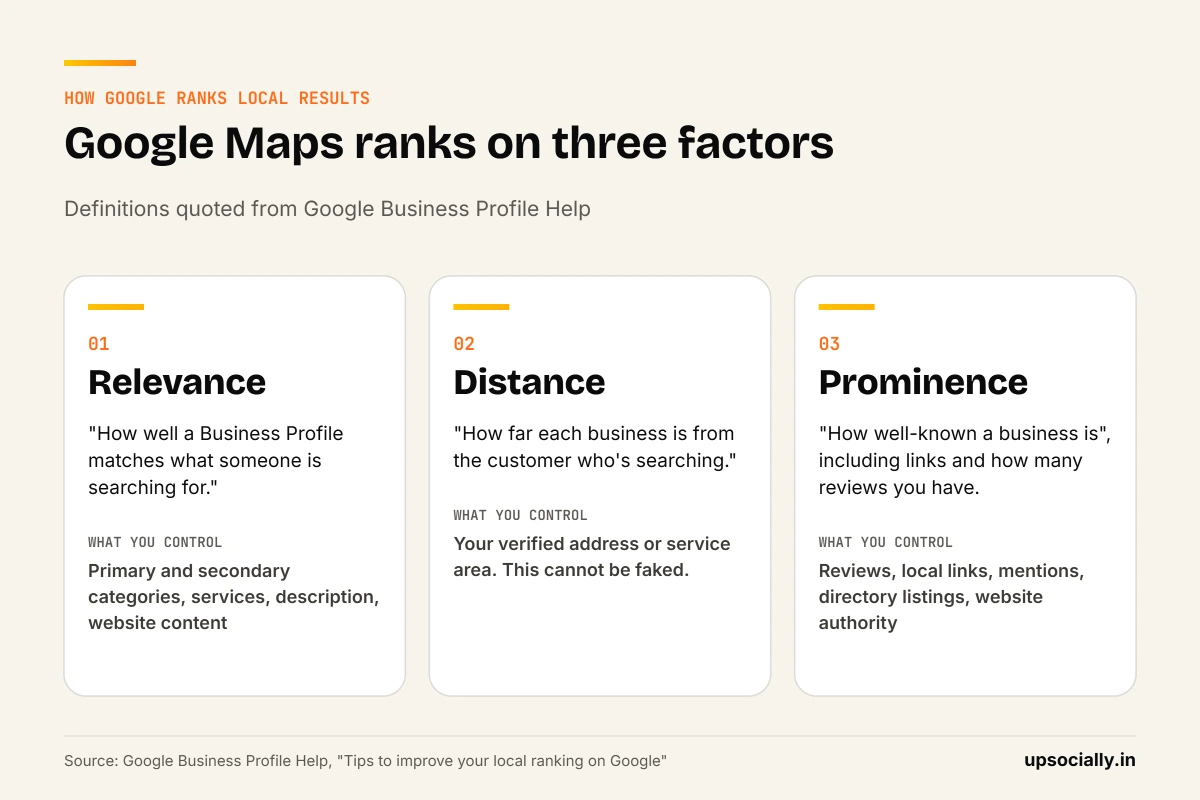
| Factor | Google’s definition | What you can control |
|---|---|---|
| Relevance | “How well a Business Profile matches what someone is searching for.” | Primary and secondary categories, services, description, website content |
| Distance | “How far each business is from the customer who’s searching.” | Your verified address or service area (you cannot fake this) |
| Prominence | “How well-known a business is”, including links to your business and how many reviews you have. | Reviews, mentions, local links, directory listings, website authority |
So when you work out how to rank in Google Maps, start with relevance and prominence. Distance is the factor most owners worry about and the one they can do least about. You will always rank better close to your address. The work is to win relevance and prominence so strongly that you also show up two or three kilometres away, where competitors are weaker.
Should you put “near me” in your business name or website?
No. Adding “near me” or area keywords to your profile name breaks Google’s guidelines, and stuffing it into web pages reads as spam. Google’s business guidelines list what a profile name must not include: marketing taglines, store codes, service or product information, location information, phone numbers or URLs. Its own example says “Equinox near SOHO” is not acceptable while “Equinox SOHO” is.
So “Sunrise Dental Clinic” is fine, but “Sunrise Dental Clinic, Best Dentist Near Me HSR Layout” risks a suspension. On your website, mention the neighbourhoods you serve in natural sentences (“we see patients from HSR Layout, Koramangala and BTM Layout”) rather than repeating “near me”.
How to rank in Google Maps: ten practical steps
Here is how to rank in Google Maps step by step. These are the steps we follow for local businesses, in the order that usually gives the fastest results. Each one maps back to relevance, distance or prominence.
1. Claim, verify and keep only one profile
Verify your Business Profile and make sure there is only one for each location. Google’s guidelines say “There should only be one profile per business”, and duplicate listings split your reviews and confuse the map. Search your business name and phone number on Google Maps to find old duplicates, then request a merge or removal.
2. Choose the most specific primary category
Pick the category that describes what you are, not everything you do. “Physiotherapy clinic” beats “Health consultant”; “Pilates studio” beats “Gym”. Add secondary categories for real extra services, but Google warns against using categories “solely as keywords”.
3. Use your real name, address and phone
Keep the name exactly as it appears on your signboard and invoices. If you travel to customers and have no staffed storefront, Google says “you should hide your business address from customers” and set a service area instead. A clinic, salon or showroom with a staffed front desk should show its address.
4. Fill in every field
Add accurate hours (including holiday hours), services with short descriptions, products, attributes, a booking link and a WhatsApp-friendly phone number. Write the business description in plain language that says what you do, for whom and where. Google says complete and accurate profiles are more likely to appear.
5. Add real photos and keep adding them
Upload your storefront, signboard, interior, team and work. Our salon marketing ideas and physiotherapy marketing ideas include photo and review routines that work for walk-in businesses. Exterior photos help people find you; interior and work photos help them choose you. Add new photos every month instead of 50 on day one and nothing afterwards.
6. Ask every happy customer for a review, the right way
Reviews feed prominence, and Google lists review count as a prominence signal. Steady reviews are one of the most reliable ways to rank in Google Maps over time. Send your review link by WhatsApp or SMS after each visit, put a QR code at the counter and train staff to ask. What you must not do, according to Google’s Maps content policy:
- Offer payment, discounts or free services in exchange for a review.
- Ask only happy customers while steering unhappy ones away (“selectively solicit positive reviews”).
- Set staff targets for a number of reviews, or ask for reviews that mention specific words.
- Post reviews from multiple accounts.
Reply to every review, positive or negative, politely and without sharing private details. For clinics, never confirm that a reviewer is a patient or discuss their treatment in a reply.
7. Build a local page for each location and service
Your website is part of relevance and prominence. Link your profile to a page for that specific location, not just the homepage. That page should state the full address, phone, hours, the areas you serve, the services offered there, an embedded map and LocalBusiness schema. Multi-branch businesses need one page per branch.
8. Keep your listings consistent everywhere
List your business with identical name, address and phone on the directories your customers use. In India that usually means Justdial, Sulekha and IndiaMART, plus Practo for doctors and clinics. In the UAE, add Bing Places, Apple Business Connect and the main regional directories in your category. Inconsistent phone numbers and old addresses weaken trust.
9. Earn local links and mentions
Google counts how many websites link to your business as part of prominence. Good sources are local news, residents’ association pages, event sponsorships, suppliers, professional bodies and “best of” articles for your city. One link from a respected local site is worth more than dozens from unrelated directories.
10. Post updates and keep information fresh
Use profile updates for offers, events and new services, and change your hours before festivals and holidays. Fresh, accurate information keeps customers from finding you closed, which protects your reviews.
How do you track your Google Maps ranking?
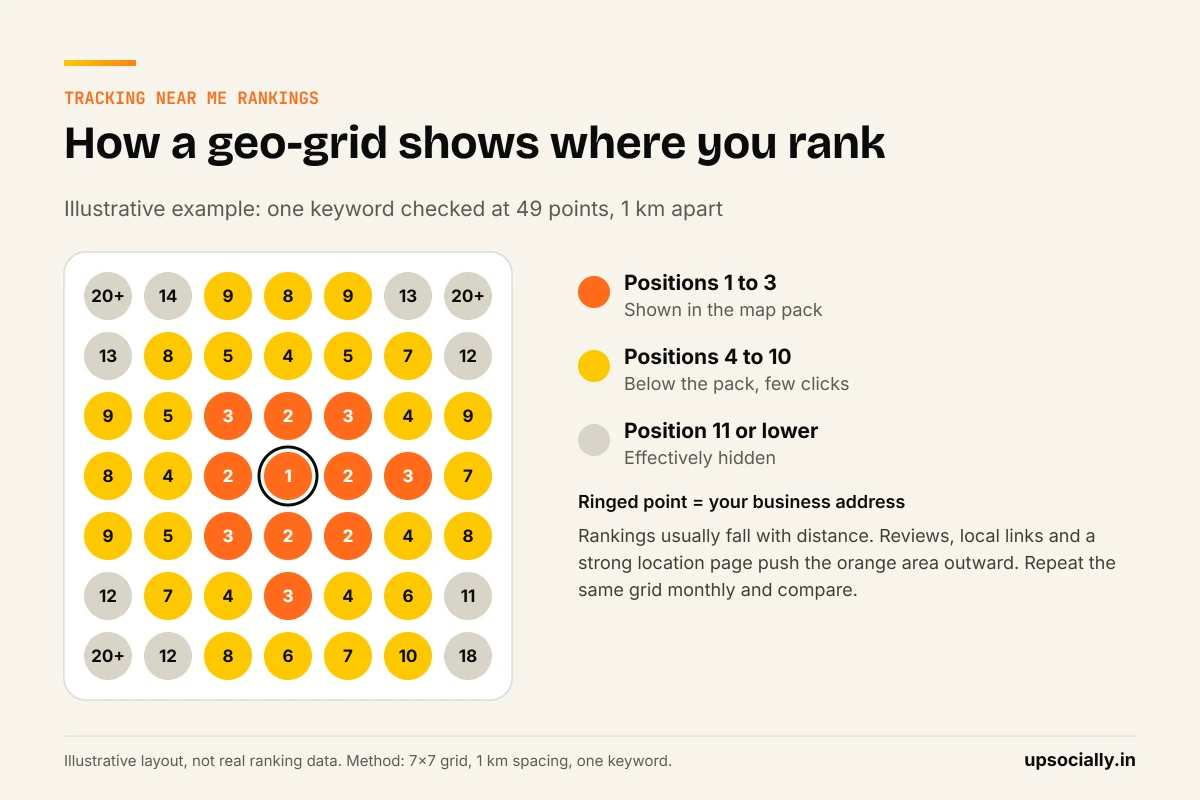
You track Google Maps rankings with a geo-grid: a map of points around your business where you check your position for one keyword. Because “near me” results change every few hundred metres, a single check from your shop tells you almost nothing. A grid shows where you win and where you vanish.
- Pick 3 to 5 keywords customers really use, such as “dentist”, “dental clinic” and “root canal treatment”.
- Set a grid of 5×5 or 7×7 points spaced 500 metres to 1 km apart around your address, wider in suburbs, tighter in dense areas.
- Record your position at each point with a geo-grid rank tracker. Positions 1 to 3 show in the map pack; anything beyond is effectively hidden.
- Repeat monthly on the same day and compare. Growth shows up as the orange area spreading outward.
- Pair it with profile insights: calls, direction requests, website clicks and the search terms people used to find you.
| What the grid shows | Likely cause | What to work on |
|---|---|---|
| Top 3 near the shop, gone after 1 km | Normal distance effect, weak prominence | Reviews, local links, location page |
| Not top 3 even at your door | Relevance problem | Primary category, services, website content |
| Strong for one keyword, absent for another | Category or service gap | Secondary category, service entries, a dedicated web page |
| Sudden drop everywhere | Edits flagged, duplicate profile or suspension | Check profile status and recent edits |
What are the Google Maps rules for doctors and clinics?
Doctors, lawyers, financial advisers and other professionals can have their own profiles, but Google has specific rules. Its guidelines say practitioner profiles “may include title or degree certification (for example Dr., MD, JD, Esq., CFA)”. A solo practitioner who is the public face of a clinic can share one profile, while multi-doctor clinics should have a profile for the clinic and, where appropriate, for each practitioner, without duplicating the clinic’s listing.
Indian healthcare adds a second layer. The National Medical Commission’s advertising guidelines, the PCPNDT Act for fertility and imaging centres, and platform health policies limit what you can claim in descriptions, posts and review replies. Keep descriptions factual, avoid “best” and success-rate claims, and never discuss a patient’s treatment in a reply. We cover this in detail in our guide to social media rules for doctors in India.
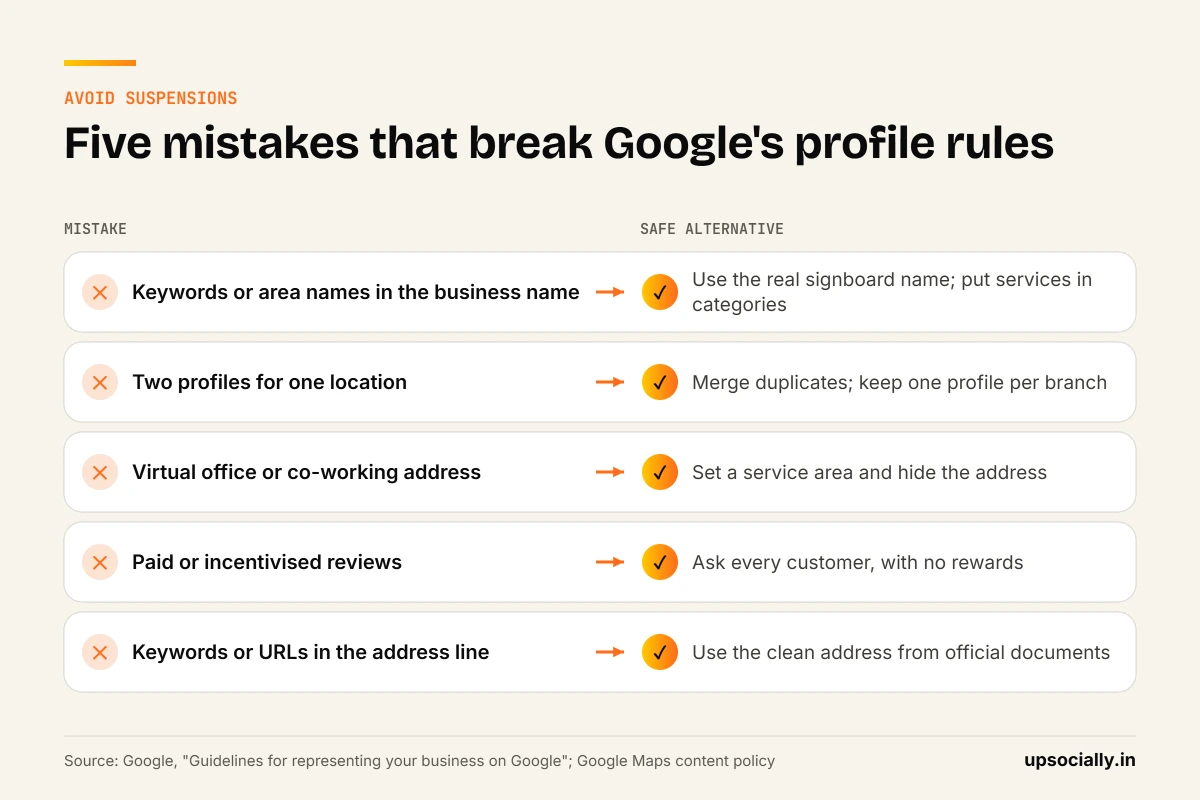
What gets a Google Business Profile suspended?
| Mistake | Google’s rule | Safe alternative |
|---|---|---|
| Keywords or area names in the business name | Name must reflect the real-world name, no service or location information | Use the signboard name; put services in categories and services |
| Two profiles for one location | Only one profile per business location | Merge duplicates; one profile per branch |
| Virtual office or co-working address | Address must be your real location; service-area businesses hide the address | Service-area profile with no public address |
| Paid or incentivised reviews | Incentivised reviews are not allowed and will be removed | Ask every customer, without rewards |
| Keywords in the address line | No URLs or keywords in address lines | Clean address exactly as on official documents |
If your profile is already suspended, fix the cause first, then submit a reinstatement request with proof such as a utility bill, shop licence or GST certificate showing the same name and address.
How long does it take to rank in Google Maps?
How long it takes to rank in Google Maps depends on your category and competition. Expect small changes within weeks and meaningful movement over months. Fixing a wrong category or name can show results quickly, while reviews and local links build prominence gradually. Clutch’s 2026 guide puts initial movement for “near me” rankings at three to six months for most businesses. Competitive categories in dense areas, such as dentists in South Bengaluru or salons in Dubai Marina, take longer than a specialist with few rivals nearby.
What is different for businesses in India and the UAE?
- Neighbourhood searches. People search “near Whitefield” or “in Anna Nagar” as often as “near me”. Mention the areas you serve on your location pages.
- WhatsApp is the real conversion. Many map searchers tap call or WhatsApp rather than visit your website. Use a phone number that is on WhatsApp Business and answer fast.
- Mixed-language reviews. Reviews in Hindi, Tamil, Kannada or Arabic help too. Reply in the reviewer’s language where you can.
- Address formats. Indian addresses with landmarks and UAE addresses using building names vary a lot. Choose one format and use it everywhere.
- AI answers draw on the same signals. ChatGPT, Gemini and Google’s AI features lean on reviews and listings for local questions. Our guide on how to get recommended by ChatGPT covers the overlap, and our Answer Engine Optimization service builds on local SEO for this reason.
Frequently asked questions
Why is my business not showing on Google Maps?
The most common reasons are an unverified or suspended profile, a duplicate listing, the wrong primary category, or simply searching from too far away. Search your exact business name first. If it appears, the issue is how you rank in Google Maps for generic searches, not visibility. See our answer on why a business is not showing on Google Maps.
Can I pay Google to rank higher in the map results?
No. Google says there is no way to request or pay for a better local ranking. You can run Google Ads with location assets so a sponsored listing appears on the map, but that is advertising, clearly labelled, and it does not change your organic map position.
Does adding “near me” to my website help?
Usually not. Google works out that a search is local from the searcher’s location, so it does not need the phrase on your page. Name the areas and landmarks you serve in normal sentences instead, and keep “near me” out of your business name entirely. Relevance comes from categories, services and content, not from repeating the phrase.
How many reviews do I need to rank in the top three?
There is no fixed number. Prominence is relative to your competitors nearby, so check how many reviews the current top three have and aim to earn reviews steadily every month. A regular flow of genuine, recent reviews matters more than a sudden burst.
Should a service-area business show its address?
Not if customers cannot visit. Google’s guidelines say a service-area business without a staffed storefront should hide its address and list the areas it serves. Hybrid businesses with a staffed location can show the address and also set a service area.
Want a team to help you rank in Google Maps?
UpSocially, a performance marketing agency in Bengaluru, India serving India, UAE and international clients, runs local SEO for clinics, studios, schools, salons and service businesses. We audit your profile, fix category and name issues, build location pages, set up review requests within Google’s rules, list you on the directories that matter and track your geo-grid every month. Explore our SEO and local search service, read our Google Business Profile optimization guide, or ask for a free local SEO audit.
Sources: Google Business Profile Help: tips to improve your local ranking · Google: guidelines for representing your business on Google · Google Maps user-generated content policy: prohibited and restricted content · Ahrefs: Google Maps SEO (citing Whitespark 2026 ranking factors) · Clutch: how to rank for near me searches in 2026. Last updated: .